Thursday, September 25, 2014
Tuesday, September 23, 2014
Honors Physics II: Week of 9/22/2014
We've done a number of online activities this week. In an effort to avoid confusion, here is a summary:
- Arduino project research: Find three interesting/cool Arduino projects that someone else has created and shared online. Send (email) me a link and/or quick description of all three of them to get full credit. (Due Monday, September 22)
- Initial project details: Complete an online form outlining your initial plans. Don't go into much detail in the materials section... ... we're going to tackle that today. (Due Wednesday, September 24)
- Electronic components order form: Complete an online spreadsheet that lists your required electronics materials. Whether or not your component will be able to reused will largely determine if the school will be able to purchase it, so please consider this. Please try to find the needed objects according to the list of "options."
Wednesday, September 17, 2014
Knight Rider!
 |
| Photo by ryanmoto, used with CC licence. |
Now that we've defeated some evil pigs over on Code.org, let's try our hand at using loops in the Arduino programming language. Rather than start from scratch, use the excellent tutorial that can be found at Arduino.cc (http://arduino.cc/en/Tutorial/Loop). Try to find 6 matching LEDs so your effects will look really cool.
Wednesday, September 10, 2014
Arduino Project 1

It's time to put what we've learned together into a (basic) project. Here's what we've worked on so far:
- Connecting the Arduino to a computer
- The Arduino IDE and uploading sketches
- Using jumper wires with a solderless breadboard
- Safely powering LEDs with Arduino
- Using pins on Arduino as digital outputs and digital inputs
- Using a momentary push button switch to indicate a logic state
- Various Arduino commands and syntax, including
At this point, you don't need to be an expert on all of the above-mentioned topics, but you should at least have a basic recollection of what we did and how they work. Go back and revisit our previous activities if necessary before continuing with this project.
- defining and assigning variables
- pinMode()
- digitalWrite()
- digitalRead()
- if()
- else()
- delay()
Click through the break to begin this project:
Tuesday, September 9, 2014
A Toggle Button
Copy and past the code below the line of asterisks:
**********************************************
Friday, September 5, 2014
Working with Inputs (Introduction)
 |
| Image used under CC0 licence |
Copy and paste the code that follows the line of asterisks:
*************************************************
// Define some variables for later use ...
// - "const int" is used for values that won't chance in our sketch
// - we're going to make a constant integer called "ledPin" and assign it to the pin the LED is connected to
const int ledPin = 8; // substitute whatever pin you're using for 8
// - now make a constant integer called "buttonPin" and assign it to the pin the button (or switch) will be connected to
const int buttonPin = 5; // susbtitute whatever pin you're using for 5
// - "int" is used for values that will change in our sketch
// - we're going to make a integer variable called "buttonState" that we'll use to measure the button's state
int buttonState;
// Intialize the pins in the setup:
void setup()
{
pinMode(ledPin,OUTPUT);
pinMode(buttonPin,INPUT_PULLUP);
}
// Put the code to be run over and over in the loop:
void loop()
{
buttonState = digitalRead(buttonPin); // we're "reading" the voltage on in the input pin and assigning it to our variable called buttonState
// Since we did a digital read, there are only two possible values now for buttonState -- it's either HIGH or LOW
if(buttonState == HIGH)
{
digitalWrite(ledPin,HIGH);
}
else
{
digitalWrite(ledPin,LOW);
}
}
Sunday, May 18, 2014
Making 3D Images
 |
| Photo by Marc Di Luzio, cc license. |
The guide can be found here:
http://graphicssoft.about.com/od/gimp/ht/3danaglyph.-UkA.htm
Have fun, be creative, and let's make some cool 3D images to share!
Wednesday, February 19, 2014
Science Fair Details
The registration deadline for the science and engineering fair at SC4 is right around the corner. We are going to again use SC4's documentation as a basis for our projects here at Yale.
Take a look at page 9 from the science fair booklet. It shows the proper layout of the finished project. Additional detail can be found in the complete booklet.
For students wishing to enter the fair at SC4, I've copied the instructions below:
Here's what you need to do:
1) Complete your fair project! Do a great job, keeping in mind what we are judging you on. See the grading rubric in the booklet to remind yourself of the requirements, or email me at jgibbons@sc4.edu<mailto:jgibbons@sc4.edu> to get a copy.
2) Participate in your own school fair. If your school doesn't host a fair that's ok. Please contact me to let me know.
3) Register for the County Fair using the new web form here www.sc4.edu/science-fair<http://www.sc4.edu/science-fair> . If you are working as a group the registration form will allow you to sign up using one form for the group.
4) Send in your $10 registration fee per participate. Each member of the group needs to pay a registration fee since that is what we use for your shirts and pins, etc...Make checks payable to St. Clair County Community College. Mail your payment to:
SC4 Business Office
Attn: Science Fair
Room 220 Main Building
323 Erie St.
P.O. Box 5015
Port Huron, MI 48061-5015
5) Go to the SC4 College Center building on March 6th between 3:30 and 6 pm to set up your project. This is the same location it has been for many years now.
6) Check the website (I hope) for an update on which participants are invited back to the fair for a second round of judging. This judging determines the Grand Awards and the Best of Show awards. The top Blue Ribbon winners will receive a call to arrange for an appointment on Saturday morning to help the judges understand their work. This is required to be considered for a Grand or Best of Show Award.
7) All participants are invited back to the open exhibit time between 12-2pm on Sunday, March 9th. The Awards ceremony will be held at 2 pm in the Fine Arts Theater.
8) After the ceremony participants are encouraged to remove their projects from the College Center. Everything needs to be picked up by 5 pm on Sunday.
Thursday, January 16, 2014
Science Fair 2014: Science vs Engineering
 |
| Image used with CC licence |
In thinking about the upcoming science fair, an important decision is which type of project to choose--either a science project or an engineering project. While they share many common aspects, they are fundamentally different. Do you want to design and build something to accomplish a particular task? Are you curious how something works, or how one quantity might affect another? These are questions to ask yourself while deciding what type of project to do.
Here a few resources to use when deciding:
- The judging criteria for the Flint Regional Science Fair and the Intel International Science and Engineering Fair. (The St. Clair County Science and Engineering Fair uses a similar form.)
- A scoring rubric that does a nice job comparing and contrasting science and engineering projects.
Weigh in--what type do you think you'll do and why?
Monday, January 13, 2014
Science Fair 2014: Getting Started

Often, the hardest part about doing a science fair project is selecting a topic to study. It's best to choose a topic that interests you. Coming up with an original idea is nice, but sometimes we need a little inspiration.
- Do a Google image search for winning science fair projects. Try to draw some quick generalizations... ... Are there any similarities among various winners (not in their subjects, but in their presentation or style)?
- There are many resources online with science fair project ideas. Let's use the one featured at education.com. Browse through the list, read them, and write down at least three topics that you might find interesting. Make sure your choices are not the same as anyone else sitting near you in class (we want unique projects!).
Tuesday, December 17, 2013
What is RepRap?
 |
| The Makerbot Replicator 2 3D printer |
- What is RepRap? What does it stand for?
- What are the initiative's goals?
- What progress has been made?
- What are the technical (or other challenges)?
- Do you think this is an important idea? Explain your reasoning.
Monday, November 25, 2013
Thinking about the Science Fair
 |
| Photo used with creative commons license from jshontz |
I'd argue that the baking soda and vinegar volcano most likely is an example of a demonstration rather than an experiment. Let's discuss this idea a bit further:
- What are the characteristics of a science experiment?
- How does a science demonstration fall short of an experiment?
- Would you agree with my judgement that the volcano project is more likely a demonstration?
- Do some searching online of "science fair projects." Can you find other examples projects that students have done that are demonstrations? If so, provide the link in your comments.
Thursday, November 7, 2013
Simple? Harmonic? Motion
 |
| Graph of sine from Wolfram|Alpha |
Tuesday, October 29, 2013
When the Normal Force is not Normal

Alternatively, do you have any questions about either the normal force or friction?
Thursday, October 17, 2013
The Curveball
 |
| Photo by Sean Winters |
- Many baseball terms exist to described pitches that curve. For example, curveball, screwball, slider, and cutter. What are the distinguishing characteristics of these pitches? Are there other terms that belong on this list?
- What causes a pitch to curve (or break)?
- Does the shape of a baseball affect how much it breaks? If so, what shape ball would break the most?
- Does the speed of the ball affect how much it breaks?
- Thinking about 3 and 4, what kind of ball could you use to demonstrate various breaking pitches? Ideally, the ball would be easy to throw and it would very noticeably break.
Wednesday, October 2, 2013
Thinking about Free Fall

We've been talking about free fall in physics class. Consider the following questions:
- What are some examples of object that are in free fall (or at least "nearly" in free fall)?
- Can an object be in free fall and have a velocity of zero? Explain.
- Suppose the acceleration of gravity on Planet X is 20 m/s/s. How long would it take an object to fall to the ground from a height of 100 meters on Planet X? (Don't just give a numeric answer. Explain your reasoning.)
- The acceleration of gravity on the Moon is about 1/6 as much as Earth's. Suppose an astronaut throws a ball up vertically with an initial velocity of 20 m/s. How high above the Moon's surface will the ball rise? (Don't just give a numeric answer. Explain your reasoning.)
Select one of the above questions and leave your answer as a comment. You can also comment about what another student has said. Please don't continue to comment on a discussion that has been "solved".
Sunday, September 22, 2013
Analog Inputs

Discussion:
We've investigated using the Arduino to read in a digital value. In this case, digital means that a quantity can only have one of two values, namely HIGH (synonymous with "1" or +5 V) or LOW (synonymous with "0" or ground).
Click through the break to begin this activity.
Tuesday, September 17, 2013
A Better Button
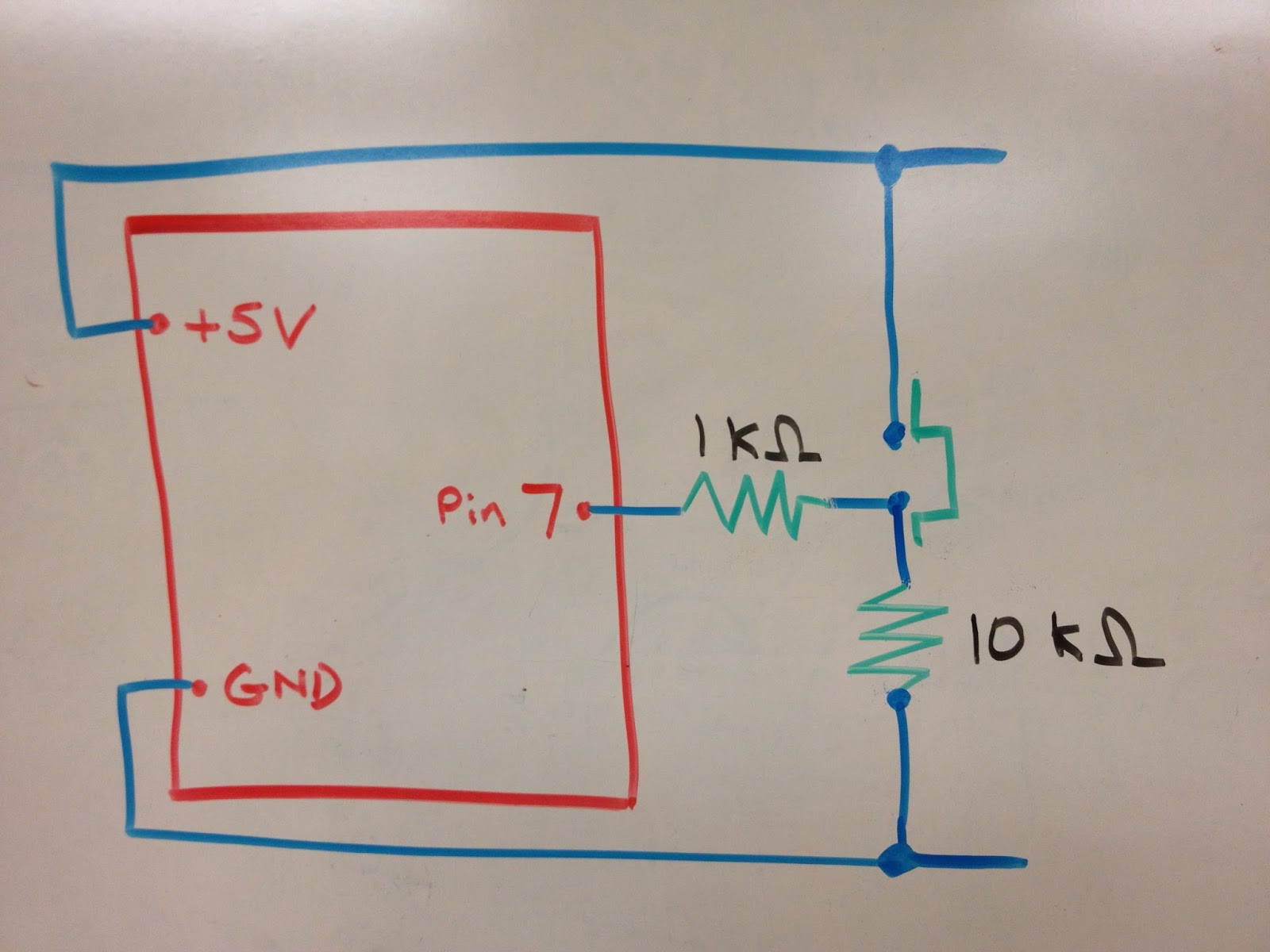
Components needed for this lab:
- push-button momentary switch
- (1) 1-k resistor
- (1) 10-k resistor
- several hook-up wires
Discussion:
- Use the diagram above to build the circuit with the button
- In this case, the 10-k resistor is called a "pull-down" resistor because it normally "pulls" pin 7 to ground. The default "reading" of pin 7 will be LOW since it is connected to ground.
- When the button is depressed, pin 7 is also connected to +5 volts. Since the button itself offers almost zero resistance, pin 7 is "closer" to 5 V than ground, and so it will read "HIGH".
- Notice that when the button is depressed, the +5-volt rail is connected to the ground rail and current will flow between the two. That's why it is imperative to use a fairly large (in this case, a 10-k) resistor--we don't want too much current flowing in that branch of the circuit, overheating the button, and possibly burning out the pins of our Arduino!
Click through the break for more instructions... ...

Thursday, September 12, 2013
Arduino Link
 |
| CC image licence BY-NC-SA 3.0 |
- Click here for the "S.O.S." code discussed in class.
- Click here for the "Let's Use a Switch!" code discussed in class.
Wednesday, January 30, 2013
Science Fair: 2013
 |
| Photo by Mars P. |
Getting Started
The complete informational packet for the 16th Annual St. Clair County Science and Engineering Fair is now posted online.
- There are three major project categories. What are they?
- What are the maximum allowable dimensions for a high school science fair project's display?
- What would be the proper way to cite a Times Herald newspaper article called "Great Lakes are Really Great"? The article was written by Joe Smith on January 17, 2013.
- Draw a rectangle on your page. If this rectangle represents a typical 3-sided display board, label the major components.
- What is the difference between an independent variable and a dependent variable? Give an example of each for a hypothetical experiment.
- What is an abstract? How long should it be?
Choosing a Project Type
One of the first choices to make when thinking about what you want to do with your project is deciding whether to do an engineering project or a science project. Use the Science Buddies' site to answer the following questions.
- What are the steps of the typical "engineering design process"?
- What steps are similar when comparing the "engineering design process" and the "scientific method"?
Choosing a Specific Project
Often, the hardest part about doing a science fair project is selecting a topic to study. It's best to choose a topic that interests you. Coming up with an original idea is nice, but sometimes we need a little inspiration.
- Do a Google image search for winning science fair projects. Try to draw some quick generalizations... ... Are there any similarities among various winners (not in their subjects, but in their presentation or style)?
- There are many resources online with science fair project ideas. Let's use the one featured at education.com. Browse through the list, read them, and write down at least three topics that you might find interesting. Make sure your choices are not the same as anyone else sitting near you in class (we want unique projects!).
Note about comments: comments have been disabled for this post because this is a specific outline we're following as an in-class assignment.
Subscribe to:
Posts (Atom)